Models & keys
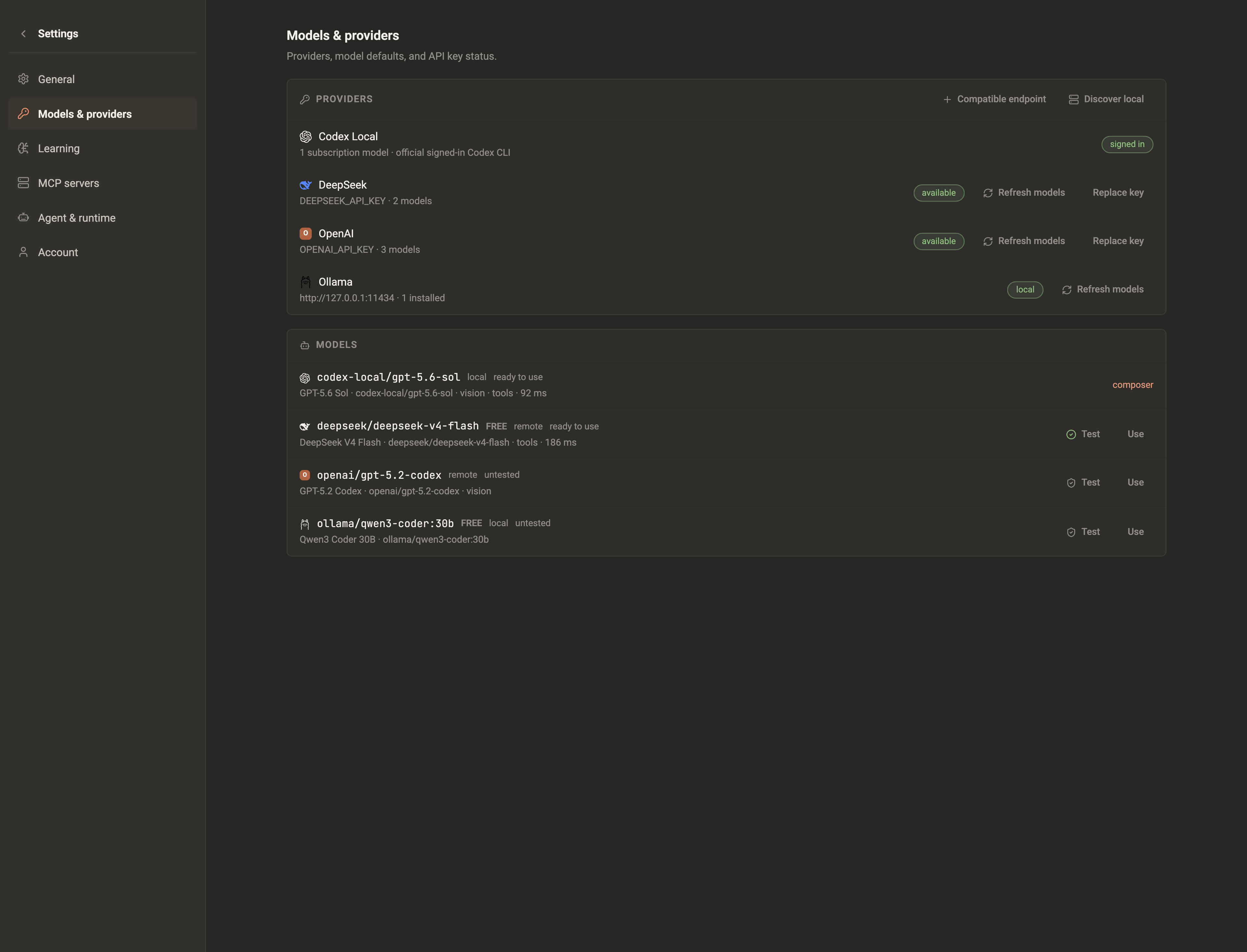
Shrevix supports a defined registry of API-key providers through LiteLLM, subscription-backed Codex Local and Claude Local runtimes, local Ollama and LM Studio discovery, and custom OpenAI-compatible endpoints.
Add a provider
Section titled “Add a provider”- Open Settings → Models & providers.
- Pick a registered provider — DeepSeek, Gemini, OpenRouter, OpenCode Zen, Kimi, GLM, or NVIDIA — choose a Codex Local or Claude Local subscription model, or select a discovered Ollama or LM Studio model. Use the custom endpoint flow for another OpenAI-compatible service.
- For an API-key provider, paste its key. It’s stored locally in the encrypted credential vault for unsigned builds, never sent anywhere except to that provider. Signed releases use macOS Keychain. Subscription runtimes instead use the official CLI sign-in already available on this computer; Shrevix reads only non-secret availability status and never stores those CLI credentials.
- Choose the active model for the provider registry. New conversations use Codex Local’s signed-in default when it is available; the composer still lets you select another provider and model for that conversation.
| Setup path | Available choices |
|---|---|
| Registered remote providers | DeepSeek, Gemini, OpenRouter, OpenCode Zen, Kimi, GLM, NVIDIA |
| Subscription runtime | Codex Local and Claude Local models available to their signed-in accounts |
| Discovered local providers | Ollama, LM Studio |
| Compatible custom endpoint | OpenAI-compatible base URL, model name, and credential |
The provider settings page shows only the choices exposed by the current app and any local services it discovers; it does not assume that every LiteLLM provider has a first-class setup flow.
Before the first request to a remote provider, the desktop explains which prompt and selected context will leave the machine. Local models keep inference on-device.
Use Codex Local
Section titled “Use Codex Local”When the official Codex runtime is installed and signed in on the computer, Codex Local appears as a provider with the models and reasoning efforts available to that account. New conversations select its default model automatically; you can change it from the normal composer model menu.
Codex Local is a runtime, not a second agent shell. Shrevix still owns the conversation, agents, skills, knowledge, learnings, workflows, documents, approvals, and connected MCP tools. Only model execution and subscription transport are delegated to the signed-in Codex runtime.
Use Claude Local
Section titled “Use Claude Local”Install the official Claude CLI and complete login yourself in a terminal. Use
claude auth status to confirm the account is ready. Shrevix does not initiate
login or logout and does not read, copy, encrypt, or store Claude credentials.
Restart Shrevix if the CLI was installed while the desktop was open, then pick
Claude Local and one of the models advertised by your subscription.
Claude Local has the same Shrevix experience as other conversation runtimes: streaming text and thinking, model and effort controls, attachments, durable session continuation, Plan and Build modes, command/file approvals, agents and delegation, knowledge and learnings, documents, workflows, and Shrevix-managed MCP connections. It is also available from a paired remote browser while the desktop remains online.
Shrevix starts Claude in safe mode with empty Claude setting, skill, plugin, hook, and agent sources, and with strict MCP isolation. Therefore Claude-side CLAUDE.md instructions, native skills, plugins, hooks, custom agents, workflows, and MCP servers are intentionally unavailable in Shrevix. If an equivalent capability is configured in Shrevix, Claude can use the Shrevix version. Claude’s built-in file, search, shell, and web tools remain available under Shrevix mode, workspace, and approval controls.
Switch models per conversation
Section titled “Switch models per conversation”The composer’s model picker overrides the active model for that conversation — run a fast, cheap model for routine tasks and a heavyweight one when it matters. Your choice sticks for the conversation, including replies.

Dial the reasoning effort
Section titled “Dial the reasoning effort”Next to the model picker sits Think — how hard the model reasons before it answers, from off through low / medium / high / extra-high to ultra. Higher levels buy more careful answers on hard problems at the cost of time and tokens; off skips reasoning for quick lookups.
The picker only offers what the active model can actually do — some models reason at every level, some only toggle on and off, and for models with no reasoning control the picker disappears entirely. Like the model choice, the level sticks for the conversation, including replies.
Vision
Section titled “Vision”If your model can see images, pictures you attach go straight to it. Text-only models can fall back to local OCR when Tesseract is installed and available to Shrevix. Without vision support or OCR, use a text or PDF source the model can process instead.